
I packed a 220+ box, coast-to-coast move alone, built a label and QR inventory system to support me, and used the move to test and improve for my next move.
Role: Product Designer, builder
Team: Me (A solo project, self initiated)
Timeline: 2 days for prototyping, 3 weeks for use and testing
Tools & Skills: Google Forms, Google Sheets, Google Photos, QuickChart API (QR Codes), Systems Thinking, AI Assisted Design, Thermal Printer
The problem
How can one person pack a 1,600 sqft home so it can be unloaded and organized in a few days, instead of weeks?
I am a military spouse, and this was my first time packing alone. While I have moved approximately 8 times in my lifetime, this time I was left to do it myself. While the family was there to physically move and load/unload the items, I was left to pack and organize a whole house by myself. On previous moves without consistent and clear labeling, it took 2 adults 3-4 weeks to unpack effectively, boxes ended up piled in one room and slowly unpacked and organized box-by-box.
When I was younger, I remember a large move my grandparents had done effectively. They had a label system and it was effectively used for almost 30 years, and they still use it today! It was a simple system, each box had an ID and a binder with photos and records of what was inside. I wanted to build off of that tested system, but create a version that one person could use and improve it with new technology.
Who it's for
There are 3 situations where someone will be interacting with this system:
Me, packing solo: I needed a way for fast entry and decisions already pre-set for me. Moving alone came with other responsibilities other than packing, labeling effectively was not one I was willing to spend my energy on.
My spouse and family: Physically moving and unpacking from their perspective only needed a clear label and didn’t know how I packed everything.
Spouse and I later: I need to be able to search for an item later, and be able to find the corresponding box.
Insights
Label selector cost more time than it was worth: I assumed providing an option to pick and print a label at any point in the moving system was the most effective. However, I found out that this feature was more cumbersome than manually writing on the box at this point. After approximately 20 boxes of packing my books, I left feeling more overwhelmed with the time spent than I would have if I used a sharpie and wrote “Books”.
The label needed to support someone who didn’t live with us: In my last move, my father-in-law wanted to ensure that his labor was used efficiently, but the boxes were not labeled, so most items were left in the garage or in the kitchen. I was left to spend several days opening every box, sorting the items, and moving them to their spot without any support. Creating a label system to direct someone without me being there was the goal.
Ideation
This system was based off of my grandparent's system, I kept the core idea, but used new technology to speed up the process.
What is an effective way of digitizing this system?
Grandparents' system: Box -> Handwritten Label with ID -> Binder with photos and contents -> CD with folders and storage of photos with Box ID label for search later.
My Version: Box -> Form with preset values and photo -> Database (Google Sheets) -> Auto ID, QR, and Label Creation -> Database (Sheets) for retrieval later
I knew that writing everything by hand was tiring but printing and creating 2 separate areas of information was not efficient. I knew from past experience from other projects that I could use a database of information and key identifiers to help organize and retrieve information. This was where AI helped support some of the initial ideation. Through back and forth conversation, I solidified my goals and narrowed the initial test; I needed a box to have individual identification to be able to be retrieved for future use and time spent creating a label needed to be equivalent or faster than its counterpart (sharpie).
How it was built:
While I have experience creating full-stack applications, time was not something I had. I also did not know if this product would solve my problem efficiently enough. I proposed an MVP to validate if my idea was worth improving upon. I chose to create a product via a no-code solution with tools such as Google Forms, Google Sheets, and an API for QR code population. These options were chosen because they were free and easy to use with lots of documentation.
AI Disclaimer: While I remained the designer of this product, I used AI (ChatGPT) to help implement label logic, explore potential solutions, document and analyze findings. AI generated the formulas, I typed each one myself, checked it against the documentation, and tested it on real boxes. With the support of AI, I was able to complete this project more efficiently and quicker than I could have on my own.
Key decisions
Auto generated Box ID labels with room codes and sequential numbering:
I gave every box an ID made of a room code and a sequential number, not just the contents. This allowed me to tell apart boxes from the same room. By creating a box ID, I could potentially reuse this box for a future move (built, not tested for future moves). While I could have omitted this detail for less confusion, this box ID created a way to easily separate a box from its counterparts also with the same room label.
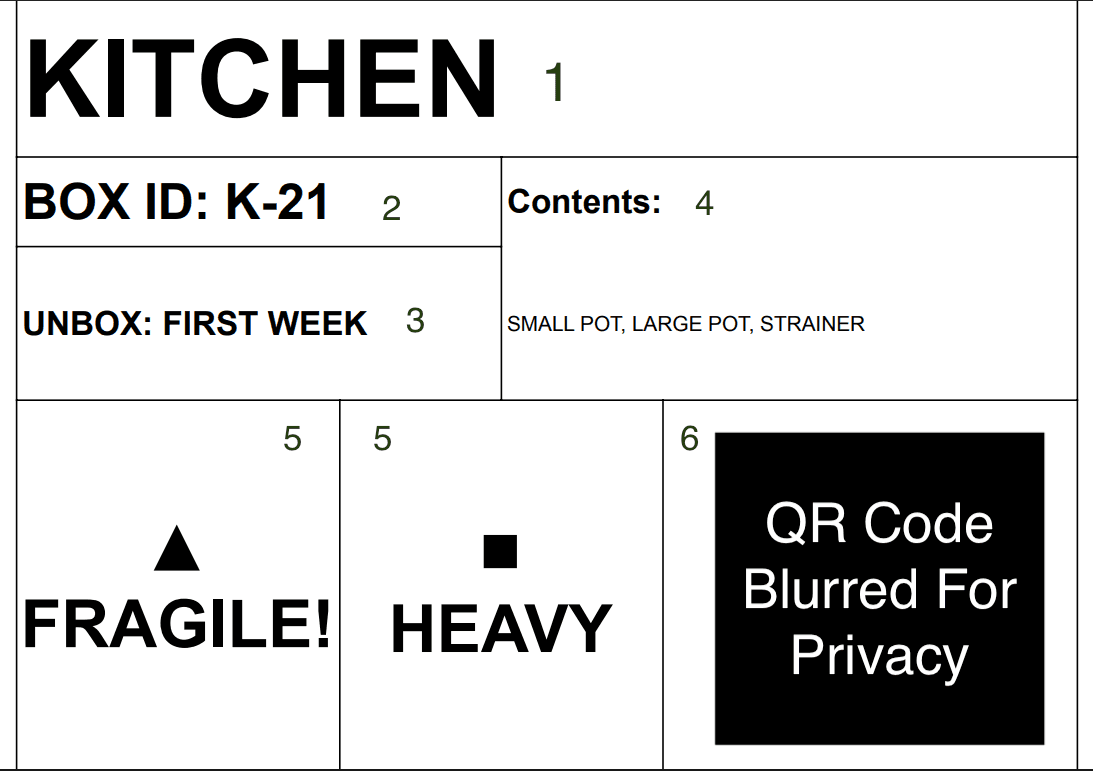
Label Contents:
Large room label, this was so it could be easily identifiable for the people who were moving the items.
Box ID, an easy way to identify identical room boxes
Unbox Priority, this was for the unpackers (me) to know if it could be unpacked the first week, first day, or put in storage.
The content section was small because the QR Code and the Photo solved this. It was only there for secondary information if something happened to the QR code or someone did not have a phone to access the photo.
Warning labels were basic because the thermal printer restricted the use of complex emojis. With the support of AI I ideated my options of what iconography to choose.
QR code (redacted for security purposes), was large and prominent for people to access boxes on their devices from a distance.
QR Code built from free API integration and Google Photos: From past experience I knew I forgot what items were in that box or even mislabeled. My Christmas decor boxes said “Christmas”, but I did not know which box had my stockings. A photo ensures that if there was a potential mislabel, a quick scan of a QR code could reduce time of taking a box down from a storage wall/shelf and searching inside of it. By using a Google Sheets function to create an image based on a Google Photo that was submitted via form submission, it auto created a QR from an API (I ensured for testing that my API would not pass free tier limits). While this required me to take a photo of the items inside increasing the time needed for submitting the form, the tradeoff was that in the future it could be retrieved for better item visibility.
Auto generated label system for easy printing: To ensure efficiency, on a separate tab of the Google Sheets, a label was generated off of the information from the selected entry/submission. This allowed me to quickly export and print this on a 4x6in thermal sticker for quick labeling. On the label I had all the information in a clean and legible manner. Location, ID, contents, handling warnings, and a QR label that opens to a photo with the box contents. Printing the labels was still the slowest part of the system, because I moved between the form, sheet, camera and printer. I accepted this tradeoff before committing to a full stack application.
Validation
Testing
For individual box packing:
Problem: On the first day, I tested with approximately 20 (10% of total boxes) boxes of books. After the first test I realized that it took too much time to individually select the label I wanted to generate and then print it.
Adjustment: This prompted me to change the formula in the Sheets and have the last box that was submitted to be generated for export and print. The initial test reduced the time from packing to labeling from 3-4 minutes to about 2-3 minutes (I did not time these with a tool, these are my personal estimations).
For search and retrieval
Problem: Searching for the items was inefficient. After about 40-50 boxes were submitted and labeled, finding the items with an exact basic search query was useless. I couldn't effectively find what I was looking for, partial words and plurals were not accounted for.
Adjustment: This prompted me to use AI to adjust the query that allowed all results to be returned if it “included or contained” some of the query. This allowed for a search of “bo” to return “books”
Final design

Final Search Spreadsheet (contents partially redacted), showing that books could be found with “bo” search.

Photo of a box in my garage for future use.
Result
After moving successfully from one side of the country to the other, I was able to effectively unpack and organize boxes within 2 days of labor (my spouse, father-in-law and I) and unpack and organize items within the first week. The biggest win was that boxes that did not need to be opened were never opened, they stayed in the garage until they were needed or will be needed. I am still using this system today (2 months later) to find items when I couldn't remember where I packed them. By my estimate, something that would've taken me days to find has been reduced to a quick query and a simple search for the label. While the last two of my moves had a varied amount of people to support labor, there was a significant improvement in reduced labor that needed to be done (more time to eat pizza! 🍕).
Reflection
What worked
Starting from a system that has worked for almost 30 years of use, and building something that I could use immediately proved to be the most helpful. Testing this system out on my own move showed me what to get rid of and what to improve on in the future. Being able to go down to my garage and use a QR code on my boxes without having to take them down and search through them has been the best outcome of this all.
What I would change
Create a single app that combines all the functions. Moving from Forms, to Sheets, to Camera, to Printer is cumbersome and adds more time than necessary. While this was important to test if this product was viable for future use, the next step is to make it more accessible.
What I learned
I learned to question my own features. While the label selector made sense for future retrieval, after real use it showed it added an unnecessary step that the printer already did for me. I also learned how AI assisted design can help reduce the time for building out a prototype for testing.